Building a Design System Widget
This guide walks through creating a design system button with Mix, demonstrating Specs, Stylers, variants, and state handling — using annotations and code generation to eliminate boilerplate.
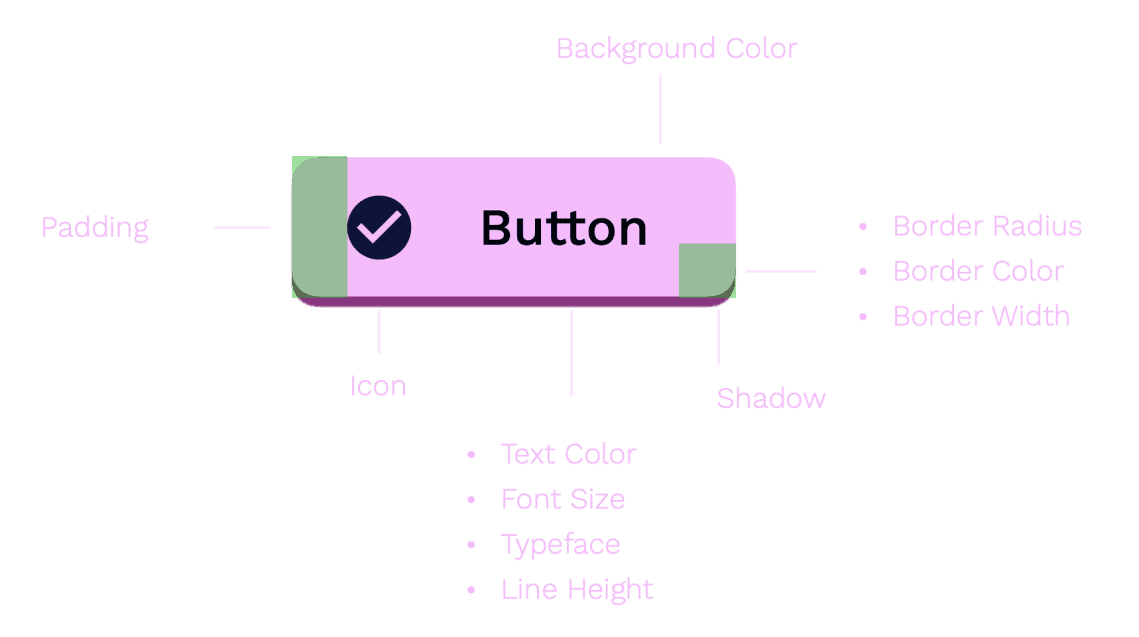
Component Overview
Button Variants
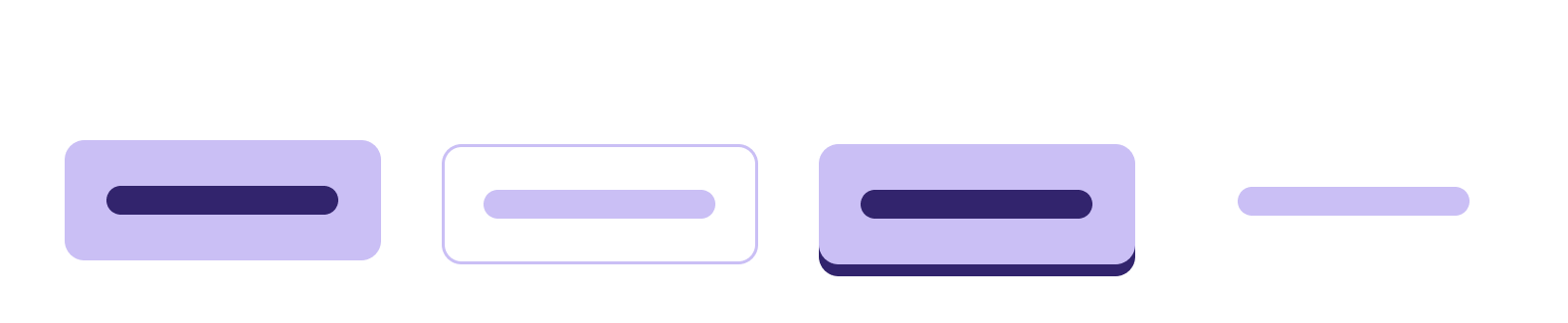
- Filled: Solid background color
- Outline: Transparent background with visible border
- Elevated: Shadow effect for raised appearance
- Link: Looks like a clickable link, no background
Button States
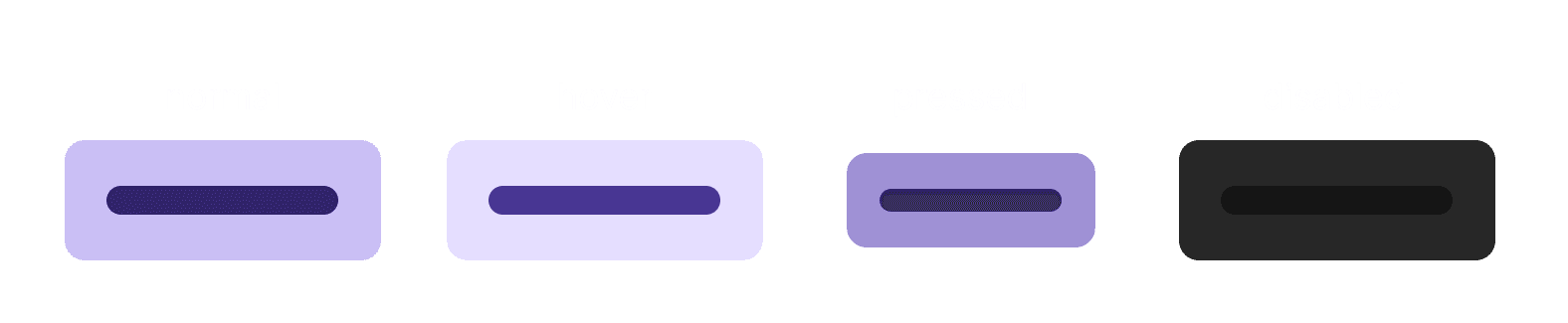
- Normal: Default state
- Hover: Mouse over or keyboard focus
- Pressed: Actively being pressed
- Disabled: Non-interactive
Button Structure
- Container: Box decoration (border radius, background color, spacing)
- Icon (optional): Visual embellishment
- Label: Text content
Create a Button Spec
A Spec defines resolved visual properties. With @MixableSpec(), the generator creates copyWith(), lerp(), debugFillProperties(), and props for you:
import 'package:flutter/foundation.dart';
import 'package:flutter/material.dart';
import 'package:mix/mix.dart';
import 'package:mix_annotations/mix_annotations.dart';

part 'button_spec.g.dart';

@MixableSpec()
@immutable
final class ButtonSpec extends Spec<ButtonSpec>
    with Diagnosticable, _$ButtonSpecMethods {
  @override
  final StyleSpec<FlexBoxSpec>? container;
  @override
  final StyleSpec<IconSpec>? icon;
  @override
  final StyleSpec<TextSpec>? label;

  const ButtonSpec({this.container, this.icon, this.label});
}
That’s it — no manual copyWith, lerp, or props. The generated mixin _$ButtonSpecMethods provides all of those. Run code generation with:
dart run build_runner buildGenerated code (button_spec.g.dart)
button_spec.g.dart)// GENERATED CODE - DO NOT MODIFY BY HAND
part of 'button_spec.dart';
mixin _$ButtonSpecMethods on Spec<ButtonSpec>, Diagnosticable {
StyleSpec<FlexBoxSpec>? get container;
StyleSpec<IconSpec>? get icon;
StyleSpec<TextSpec>? get label;
@override
ButtonSpec copyWith({
StyleSpec<FlexBoxSpec>? container,
StyleSpec<IconSpec>? icon,
StyleSpec<TextSpec>? label,
}) {
return ButtonSpec(
container: container ?? this.container,
icon: icon ?? this.icon,
label: label ?? this.label,
);
}
@override
ButtonSpec lerp(ButtonSpec? other, double t) {
return ButtonSpec(
container: container?.lerp(other?.container, t),
icon: icon?.lerp(other?.icon, t),
label: label?.lerp(other?.label, t),
);
}
@override
void debugFillProperties(DiagnosticPropertiesBuilder properties) {
super.debugFillProperties(properties);
properties
..add(DiagnosticsProperty('container', container))
..add(DiagnosticsProperty('icon', icon))
..add(DiagnosticsProperty('label', label));
}
@override
List<Object?> get props => [container, icon, label];
}Create a Button Styler
ButtonStyler provides a fluent interface for styling. With @MixableStyler(), the generator creates setters, merge(), resolve(), debugFillProperties(), and props.
Use @MixableField(setterType: ...) to tell the generator the public type for each setter. Since the fields are Prop<StyleSpec<T>> internally but users pass Styler types, setterType bridges that gap:
part 'button_style.g.dart';

@MixableStyler()
class ButtonStyler extends MixStyler<ButtonStyler, ButtonSpec>
    with _$ButtonStylerMixin {
  @override
  @MixableField(setterType: FlexBoxStyler)
  final Prop<StyleSpec<FlexBoxSpec>>? $container;
  @override
  @MixableField(setterType: IconStyler)
  final Prop<StyleSpec<IconSpec>>? $icon;
  @override
  @MixableField(setterType: TextStyler)
  final Prop<StyleSpec<TextSpec>>? $label;

  ButtonStyler({
    FlexBoxStyler? container,
    IconStyler? icon,
    TextStyler? label,
    super.animation,
    super.modifier,
    super.variants,
  }) : $container = Prop.maybeMix(container),
       $icon = Prop.maybeMix(icon),
       $label = Prop.maybeMix(label);

  const ButtonStyler.create({
    Prop<StyleSpec<FlexBoxSpec>>? container,
    Prop<StyleSpec<IconSpec>>? icon,
    Prop<StyleSpec<TextSpec>>? label,
    super.animation,
    super.modifier,
    super.variants,
  }) : $container = container,
       $icon = icon,
       $label = label;

  // Convenience methods (beyond the generated container/icon/label setters)
  ButtonStyler backgroundColor(Color value) {
    return merge(ButtonStyler(container: FlexBoxStyler().color(value)));
  }

  ButtonStyler textColor(Color value) {
    return merge(ButtonStyler(label: TextStyler().color(value)));
  }

  ButtonStyler iconColor(Color value) {
    return merge(ButtonStyler(icon: IconStyler().color(value)));
  }

  ButtonStyler borderRadius(double value) {
    return merge(ButtonStyler(container: FlexBoxStyler().borderRounded(value)));
  }

  ButtonStyler padding({required double x, required double y}) {
    return merge(
      ButtonStyler(container: FlexBoxStyler().paddingX(x).paddingY(y)),
    );
  }

  ButtonStyler scale(double value) {
    return merge(ButtonStyler(container: FlexBoxStyler().scale(value)));
  }
}
The @MixableField(setterType: FlexBoxStyler) annotation tells the generator to produce ButtonStyler container(FlexBoxStyler value) instead of ButtonStyler container(StyleSpec<FlexBoxSpec> value). This gives users the fluent Styler API they expect.
MixStyler already provides WidgetStateVariantMixin (for onPressed, onHovered, onDisabled, etc.), VariantStyleMixin, and AnimationStyleMixin — so you get state handling for free.
The generated _$ButtonStylerMixin handles setters, merge(), resolve(), debugFillProperties(), and props:
Generated code (button_style.g.dart)
button_style.g.dart)// GENERATED CODE - DO NOT MODIFY BY HAND
part of 'button_style.dart';
mixin _$ButtonStylerMixin on Style<ButtonSpec>, Diagnosticable {
Prop<StyleSpec<FlexBoxSpec>>? get $container;
Prop<StyleSpec<IconSpec>>? get $icon;
Prop<StyleSpec<TextSpec>>? get $label;
// Generated setters using @MixableField(setterType:)
ButtonStyler container(FlexBoxStyler value) {
return merge(ButtonStyler(container: value));
}
ButtonStyler icon(IconStyler value) {
return merge(ButtonStyler(icon: value));
}
ButtonStyler label(TextStyler value) {
return merge(ButtonStyler(label: value));
}
@override
ButtonStyler merge(ButtonStyler? other) {
return ButtonStyler.create(
container: MixOps.merge($container, other?.$container),
icon: MixOps.merge($icon, other?.$icon),
label: MixOps.merge($label, other?.$label),
variants: MixOps.mergeVariants($variants, other?.$variants),
modifier: MixOps.mergeModifier($modifier, other?.$modifier),
animation: MixOps.mergeAnimation($animation, other?.$animation),
);
}
@override
StyleSpec<ButtonSpec> resolve(BuildContext context) {
final spec = ButtonSpec(
container: MixOps.resolve(context, $container),
icon: MixOps.resolve(context, $icon),
label: MixOps.resolve(context, $label),
);
return StyleSpec(
spec: spec,
animation: $animation,
widgetModifiers: $modifier?.resolve(context),
);
}
@override
void debugFillProperties(DiagnosticPropertiesBuilder properties) {
super.debugFillProperties(properties);
properties
..add(DiagnosticsProperty('container', $container))
..add(DiagnosticsProperty('icon', $icon))
..add(DiagnosticsProperty('label', $label));
}
@override
List<Object?> get props =>
[$container, $icon, $label, $animation, $modifier, $variants];
}Define Variants
Use an enum to define button variants with their styles:
enum ButtonVariant {
  filled,
  outlined,
  elevated,
  link;

  ButtonStyler get style {
    switch (this) {
      case ButtonVariant.filled:
        return ButtonStyler()
            .backgroundColor(Colors.blueAccent)
            .textColor(Colors.white)
            .iconColor(Colors.white);

      case ButtonVariant.outlined:
        return ButtonStyler()
            .container(
              FlexBoxStyler()
                  .color(Colors.transparent)
                  .borderAll(width: 1.5, color: Colors.blueAccent),
            )
            .textColor(Colors.blueAccent)
            .iconColor(Colors.blueAccent);

      case ButtonVariant.elevated:
        return ButtonStyler()
            .backgroundColor(Colors.blueAccent)
            .textColor(Colors.white)
            .iconColor(Colors.white)
            .container(
              FlexBoxStyler().shadow(
                BoxShadowMix()
                    .color(Colors.blueAccent.shade700)
                    .offset(x: 0, y: 5),
              ),
            );

      case ButtonVariant.link:
        return ButtonStyler()
            .container(
              FlexBoxStyler()
                  .borderAll(style: BorderStyle.none)
                  .color(Colors.transparent),
            )
            .textColor(Colors.blueAccent)
            .iconColor(Colors.blueAccent);
    }
  }
}
Create the Button Widget
CustomButton uses Pressable for interaction states and StyleBuilder to resolve styles:
class CustomButton extends StatelessWidget {
  const CustomButton({
    super.key,
    required this.label,
    this.disabled = false,
    this.icon,
    required this.onPressed,
    this.variant = ButtonVariant.filled,
    this.style,
  });

  final String label;
  final bool disabled;
  final IconData? icon;
  final ButtonVariant variant;
  final VoidCallback? onPressed;
  final ButtonStyler? style;

  @override
  Widget build(BuildContext context) {
    return Pressable(
      onPress: disabled ? null : onPressed,
      enabled: !disabled,
      child: StyleBuilder(
        style: buttonStyle(style, variant),
        builder: (context, spec) {
          return FlexBox(
            styleSpec: spec.container,
            children: [
              if (icon != null) StyledIcon(icon: icon, styleSpec: spec.icon),
              if (label.isNotEmpty) StyledText(label, styleSpec: spec.label),
            ],
          );
        },
      ),
    );
  }
}
Styling Your Button
The buttonStyle function defines base styles, merges variant styles, and adds state handling:
ButtonStyler buttonStyle(ButtonStyler? style, ButtonVariant? variant) {
  // Base styles shared across all variants
  final container = FlexBoxStyler()
      .borderRounded(6)
      .paddingX(8)
      .paddingY(12)
      .spacing(8)
      .mainAxisAlignment(MainAxisAlignment.center)
      .crossAxisAlignment(CrossAxisAlignment.center)
      .mainAxisSize(MainAxisSize.min);

  final label = TextStyler().style(
    TextStyleMix().fontSize(16).fontWeight(FontWeight.w500),
  );

  final icon = IconStyler().size(18);

  return ButtonStyler()
      .container(container)
      .label(label)
      .icon(icon)
      .merge(variant?.style)
      .onPressed(
        ButtonStyler()
            .container(FlexBoxStyler().scale(0.9)),
      )
      .onDisabled(
        ButtonStyler()
            .container(FlexBoxStyler().color(Colors.blueGrey.shade100))
            .label(
              TextStyler().style(
                TextStyleMix().color(Colors.blueGrey.shade700),
              ),
            )
            .icon(IconStyler().color(Colors.blueGrey.shade700)),
      )
      .merge(style);
}
Button Variant Widgets
Create convenience widgets for each variant:
final class FilledButton extends CustomButton {
  const FilledButton({
    super.key,
    required super.label,
    super.disabled = false,
    super.icon,
    required super.onPressed,
    super.style,
  }) : super(variant: ButtonVariant.filled);
}

final class OutlinedButton extends CustomButton {
  const OutlinedButton({
    super.key,
    required super.label,
    super.disabled = false,
    super.icon,
    required super.onPressed,
    super.style,
  }) : super(variant: ButtonVariant.outlined);
}

final class ElevatedButton extends CustomButton {
  const ElevatedButton({
    super.key,
    required super.label,
    super.disabled = false,
    super.icon,
    required super.onPressed,
    super.style,
  }) : super(variant: ButtonVariant.elevated);
}

final class LinkButton extends CustomButton {
  const LinkButton({
    super.key,
    required super.label,
    super.disabled = false,
    super.icon,
    required super.onPressed,
    super.style,
  }) : super(variant: ButtonVariant.link);
}
Results
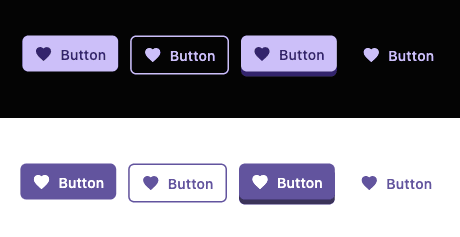
// Main App
void main() {
  runApp(const MyApp());
}

class MyApp extends StatelessWidget {
  const MyApp({super.key});

  @override
  Widget build(BuildContext context) {
    return const MaterialApp(
      home: ButtonExampleScreen(),
    );
  }
}

class ButtonExampleScreen extends StatelessWidget {
  const ButtonExampleScreen({super.key});

  @override
  Widget build(BuildContext context) {
    final icon = Icons.favorite;

    return Scaffold(
      appBar: AppBar(
        title: const Text('Button Examples'),
      ),
      body: Padding(
        padding: const EdgeInsets.all(16.0),
        child: Column(
          mainAxisAlignment: MainAxisAlignment.center,
          crossAxisAlignment: CrossAxisAlignment.stretch,
          children: [
            FilledButton(
              label: 'Filled Button',
              icon: icon,
              onPressed: () {},
            ),
            const SizedBox(height: 10),
            OutlinedButton(
              label: 'Outlined Button',
              icon: icon,
              onPressed: () {},
            ),
            const SizedBox(height: 10),
            ElevatedButton(
              label: 'Elevated Button',
              icon: icon,
              onPressed: () {},
            ),
            const SizedBox(height: 10),
            LinkButton(
              label: 'Link Button',
              icon: icon,
              onPressed: () {},
            ),
            const SizedBox(height: 20),
            const Text(
              'Disabled State:',
              style: TextStyle(fontSize: 18, fontWeight: FontWeight.bold),
            ),
            const SizedBox(height: 10),
            FilledButton(
              label: 'Disabled Button',
              icon: icon,
              disabled: true,
              onPressed: () {},
            ),
          ],
        ),
      ),
    );
  }
}
Summary
This tutorial covered:
@MixableSpec: GeneratescopyWith(),lerp(),debugFillProperties(), andprops— no manual boilerplate@MixableStyler: Generates setters,merge(),resolve(),debugFillProperties(), andprops— you only write convenience methods@MixableField(setterType:): Controls the public type of generated setters (e.g., acceptFlexBoxStylerinstead ofStyleSpec<FlexBoxSpec>)MixStyler: Base class that providesWidgetStateVariantMixin,VariantStyleMixin, andAnimationStyleMixinfor free- ButtonVariant: Enum associating variants with styles
- CustomButton: Widget combining
PressableandStyleBuilder
What you write vs. what’s generated
| You write | Generator provides |
|---|---|
| Spec fields and constructor | copyWith(), lerp(), debugFillProperties(), props |
| Styler fields, constructors, convenience methods | Setters (via @MixableField), merge(), resolve(), debugFillProperties(), props |
This pattern extends to other components: cards, inputs, dialogs, etc. Add mix_annotations to your dependencies and mix_generator to dev_dependencies, then run dart run build_runner build to generate code.